
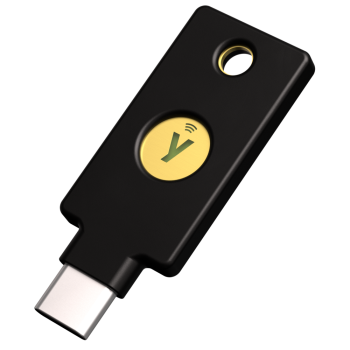
YubiKey 5 C NFC
89,00 €
(VAT included)
Phishing-resistant multi-factor authentication (phishing-resistant MFA) is a foundational element and the fastest way to reduce the attack surface and improve the risk profile.
Benefits
Using FIDO2/WebAuthn technology, the YubiKey 5 NFC enables passwordless authentication, eliminating the risks associated with weak or reused passwords.
The YubiKey 5 NFC is easy to use. Simply plug it into your device’s USB-A port or tap it using NFC for fast, seamless authentication.
Manufactured in the USA and Sweden, the YubiKey 5 NFC provides reliable, seamless authentication, ensuring the privacy and security of your data.
Thanks to its advanced technology, the YubiKey 5 NFC delivers fast and efficient authentication, saving time and increasing productivity.
Choose security that cannot be compromised.
The YubiKey 5C NFC is a hardware security solution that protects you against the most common digital attacks.
By using it, you reduce the risks associated with passwords, SMS codes, and vulnerable authentication apps.
Order now and take the next step toward modern, fast, and phishing-resistant authentication.
COMPLETE GUIDE – HOW TO SET UP THE YUBIKEY 5 NFC
COMPLETE GUIDE – HOW TO SET UP THE YUBIKEY 5 NFC
Check compatibility based on the YubiKey model you have selected by visiting the link.
2. Plug the YubiKey into an available USB port on your computer.
3. Open your browser and sign in to the online account you want to protect (email, cloud, VPN, work service, etc.).
4. Go to your account’s security settings. Look for the additional authentication option — the names may vary: “Security Key,” “Passkey,” “Multi-Factor Authentication (MFA),” “Two-Step Verification,” or “2FA.”
5. Follow the service’s instructions to add your YubiKey as an authentication method.
YubiKey supports several authentication methods, depending on the service being used:
- Security Key / Physical MFA — add your YubiKey directly as a “security key.”
- Passkey (FIDO2 / WebAuthn) — instead of using a password plus a code, YubiKey becomes the primary authentication factor.
- Using an authenticator app — you can also use Yubico Authenticator to generate OTP codes that are stored physically on the YubiKey rather than on your phone.
It is recommended to set up both a primary key and a backup key at the same time to avoid being locked out of your accounts if you lose your primary device.nThe backup key can be the same model or another compatible model from the YubiKey range.
Send a request
By clicking the button I consent to the processing of personal data and agree to the privacy policy.
